





KernLens adds 30 commands to GDB for reading a running Linux kernel. Each one reads real memory through a single reader, decodes it with arithmetic you can check by hand, and prints the answer with the entry it came from -- so a wrong result looks wrong instead of looking plausible.
It is for kernel pwn, module and driver debugging, and memory forensics,
and registers only kernlens-* and kl-* names so it loads beside pwndbg
without either tool shadowing the other. core/ and output/ are pure
Python and run without GDB at all; only the gdb/ package needs a
debuggee, and x86_64 is the only architecture the decoders are written
against.
See it run
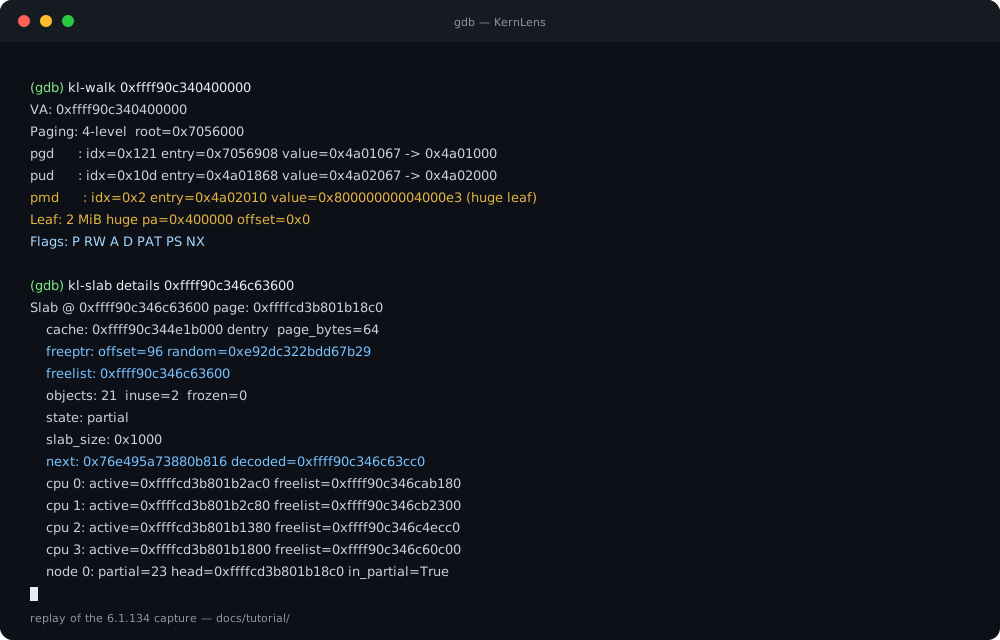
A replay of two commands from the 6.1.134 capture, not a live recording:
the text is verbatim from tools/tutorial_capture.json,
and the same session is in docs/assets/demo.cast
for asciinema play. Every number is re-derived from the kernel at run
time rather than assumed.
What it looks like
A 2 MiB mapping, walked level by level. The walk stops where the hardware does:
VA: 0xffff975280400000
Paging: 4-level  root=0x3010000
pgd      : idx=0x12e entry=0x3010970 value=0x4a01067 -> 0x4a01000
pud      : idx=0x14a entry=0x4a01a50 value=0x4a02067 -> 0x4a02000
pmd      : idx=0x2 entry=0x4a02010 value=0x80000000004000e3 (huge leaf)
Leaf: 2 MiB huge pa=0x400000 offset=0x0
Flags: P RW A D PAT PS NX
Each row shows the index, the address of the entry, the raw value, and
where the next level is. The PS bit at pmd is why there is no pte
row. Compare with the same address forced to 5-level paging:
VA: 0xffff975280400000
Paging: 5-level  root=0x3010000
pgd      : idx=0x1ff entry=0x3010ff8 value=0x3015067 -> 0x3015000
p4d      : idx=0x12e entry=0x3015970 value=0x0
Note: p4d entry is not present
The SLUB allocator, where Size and Obj Size differ when a cache rounds
up for alignment or adds metadata -- the gap an amplification attack cares
about (three rows of the 170-cache list):
Name                         # Objects  Size  Obj Size  order
ext4_groupinfo_4k            22         184   184       0
AF_VSOCK                     25         1280  1232      3
MPTCPv6                      15         2112  2064      3
And the freelist encoding, which is the part a use-after-free tracer has
to get right. The stored word is not a pointer; freeptr and the decoded
next are printed together:
Slab @ 0xffff975286c57840 page: 0xffffee5d001b15c0
    cache: 0xffff975284e1bc00 dentry  page_bytes=64
    freeptr: offset=96 random=0xae939aafdb096690
    freelist: 0xffff975286c57c00
    objects: 21  inuse=19  frozen=1
    state: frozen
    slab_size: 0x1000
    next: 0x3110c87b0f5be96f decoded=0xffff975286c57000
The arithmetic is next = stored ^ random ^ swab(slot_address); kl-slab
details shows the operands so you can recompute it. The remaining rows
(cpu, node) are omitted here and present in the command's output.
Install
From a shell, one command:
It clones the checkout under ~/.local/share/kernlens, adds one marked
block to ~/.gdbinit, and writes a kernlens wrapper to
~/.local/bin. Running it again updates the checkout instead of adding a
second block; sh install.sh --uninstall removes the block and the
wrapper and leaves the checkout alone. Read install.sh
before piping it, as with any installer.
If you would rather manage the checkout yourself:
git clone https://github.com/BinRacer/KernLens
echo "source $(pwd)/KernLens/gdbinit.py" >> ~/.gdbinit
Then:
(gdb) file vmlinux
(gdb) target remote :1234
(gdb) kl-base            # recover the KASLR slide and apply it
(gdb) kl-help            # every command, grouped by category
kl-base first, always: on a KASLR kernel every symbol in the vmlinux is
at its link-time address, and nothing resolved before the slide is
applied. Loading gdbinit.py never installs a breakpoint and is safe
before file vmlinux.
Check the load path before debugging a kernel:
It reports the host Python, the Python GDB embeds, whether ~/.gdbinit
sources an existing startup file, whether GDB can actually import
kernlens, and whether a target is attached. kl-status --doctor adds
the in-session half. Paste the report into an issue.
The host-side commands have the same short spelling as the ones inside
GDB: kl doctor is kernlens doctor, and from a checkout ./bin/kl
does the same without installing anything.
There is no PyPI release yet. The startup file is package data now and a
kernlens console script prints its path, so a wheel built from this
checkout is loadable even though GDB runs its own interpreter:
kernlens install writes the same marked block as install.sh, and
kernlens path prints the file without touching anything. Until the
first release is published, the installer above is the shorter path, and
git pull (or re-running it) is the upgrade. Contributor setup is in
CONTRIBUTING.md.
Try it in a container
The demo image compiles a small 6.1 kernel, boots it under QEMU, and
attaches GDB with KernLens sourced. No debug target, no kernel source
tree, and no /dev/kvm are needed:
The tour runs kl-status, kl-base, kl-kconfig, kl-slab info,
kl-sym, and kl-walk. Pass a command instead of the tour to run just
that one:
The kernel is built from source in the image and stripped of DWARF, so
the session is also a test of the BTF path. What is inside, and why it is
built rather than downloaded, is in
docs/en/demo-container.md.
The 30 commands
Grouped as kl-help groups them. The kl- form is what you type at the
prompt, and it is also what kl-help, the tutorial, and every usage line
show. The canonical kernlens- form is the registered name: scripts may
use it, and it is stated once per page in case the aliases are ever
renamed. Both always work. Every command, every alias, and a one-line
description is in docs/en/commands.md.
| Category | Commands |
|---|---|
| overview (1) | kl-status |
| kernel base & KASLR (1) | kl-base |
| kernel metadata (6) | kl-kcmdline, kl-kconfig, kl-kdmesg, kl-kmod, kl-ksyscalls, kl-kversion |
| addresses & page tables (6) | kl-addr, kl-p2v, kl-pageinfo, kl-pt, kl-v2p, kl-walk |
| memory & symbols (9) | kl-bt, kl-buddy, kl-kbpf, kl-kdmabuf, kl-kvar, kl-read, kl-read-field, kl-slab, kl-sym |
| CPU topology (3) | kl-cpu, kl-msr, kl-percpu |
| bit & integer primitives (2) | kl-bits, kl-int |
| output (1) | kl-color |
| help (1) | kl-help |
Every command has a page in docs/en/tutorial/ with real
captured output, its options, and a note on how to read the result.
Two things the command list does not show. kl-help <command> gives usage
and worked examples, and --help works on every command with a guided
error message rather than a bare usage line. And the commands never
stop() the debuggee: they read memory and return, so they compose inside
a breakpoint handler. kl-msr --write is the one exception -- it sets an
MSR through GDB's register interface -- and it is opt-in, never taken as
a side effect of a read.
Use it as a library
The commands are a thin layer over a Python API. From a sourced script:
# any file you source after gdbinit.py -- the names are already installed
print(split_4(0xffff888000001234))       # KPageTable, no memory read
print(read_kvar("jiffies"))              # live read through the facade
print(LE.unpack_u32(b"\x34\x12\x00\x00"))  # LE is a ByteOrderCodec
Or import it normally:
from kernlens import KAddr, KPageTable

# (0x111, 0x0, 0x0, 0x1, 0x234) -- one index per level, outermost first
KPageTable.split_4(0xffff888000001234)
KAddr.is_direct_map(0xffff888000001234)  # True
The arithmetic half needs no debugger, which is what makes it testable on
the host. The full reference is docs/en/api.md.
How it stays true
Every claim this repository makes about itself is checked by a machine, because the alternative is prose that is correct on the day it is written:
docs/en/tutorial/is generated from a capture taken on a running kernel;gen_tutorial.py --checkfails when a page and the capture disagree.- The README demo and
docs/en/commands.mdare generated too:tools/gen_demo.py --checkcompares the animation with the capture, andtools/gen_commands.py --checkcompares the command table with the registered metadata. - Example coverage is declared in
tools/example_manifest.pyand enforced bytools/check_examples.py --check: a claim without the code fails, and so does a command named in prose but never executed. - The examples that can run without a debugger are executed in CI; the rest are replayed under GDB and recorded, and the record is compared against the source on every push.
- The repository tree in
docs/en/architecture.mdand the numbers inexamples/README.mdare checked against the real tree and the real measurement, not typed by hand. - The wheel is checked, not assumed: CI builds it and
tools/check_wheel.pyfails when the startup file or the console script is missing -- the exact failure the old source-only policy existed to prevent. - The
kl-*command count on this page is checked against the command registry by the test suite, so it cannot quietly become false.
Documentation
| Document | What is in it |
|---|---|
| binracer.github.io/KernLens | the whole tree as a searchable site, both languages -- start here |
docs/en/tutorial/ |
one page per command, real output |
docs/en/demo-container.md |
a kernel under QEMU, built from source and ready to attach |
docs/en/commands.md |
every command and alias, generated |
docs/en/api.md |
the Python API reference |
docs/en/architecture.md |
package layout, API map, design notes |
docs/en/compatibility.md |
what has been run, what is expected, what is not claimed |
examples/ |
runnable scripts, grouped by intent |
docs/en/naming.md |
command and filename conventions |
CONTRIBUTING.md |
setup, tests, the layout generator |
SECURITY.md |
what counts as a vulnerability, and how to report one privately |
CITATION.cff |
how to cite the project, and the version being cited |
CHANGELOG.md |
every change, newest first |
How it relates to other tools
KernLens occupies a narrow slot, and it is worth knowing whether that is yours before installing anything.
| If you want | Use | Why not this |
|---|---|---|
| A general-purpose GDB front end while debugging a kernel | pwndbg | Its kernel commands are ports KernLens also has; pwndbg is the larger, more integrated tool. KernLens is designed to sit beside it, registering only kernlens-*/kl-* names so nothing collides. |
| To query kernel structures from Python with no debugger in the loop | drgn | drgn reads the kernel directly through its own drivers. KernLens has no such path: every read goes through GDB, which is why it can attach to a gdbserver with no guest cooperation, and also why it cannot work without GDB. |
To analyse a vmcore crash dump |
crash, drgn | KernLens reads a live target remote only; see docs/en/compatibility.md. |
| To see why a page-table or SLUB answer is what it is | this | Every command prints the intermediate values -- the entry address, the raw word, the freeptr operands -- so a wrong result is visibly wrong rather than plausible. That is the design goal, not a side effect. |
| To run page-table and freelist decoding as a library in a test | this | core/ and output/ are pure Python with no gdb import, so the arithmetic runs in a normal test suite. |
The "why not this" column is a description of scope, not a claim that one tool is better. pwndbg, drgn and crash each do things KernLens does not attempt, and the ported commands exist because pwndbg already showed what they should do.
It is one maintainer's tool. What that means in practice is in
docs/en/compatibility.md: every claim is
either measured on a named kernel, expected from the requirements, or
listed as not claimed.
Requirements and license
Python 3.10+ and a GDB built with Python 3.10+. Those are two
interpreters, not one: kernlens doctor prints both, because a GDB whose
embedded Python cannot see the package is the most common first-run
failure. x86_64 kernels only -- the page-table and struct page decoding
are written against that architecture. On Python below 3.12 the only
runtime dependency is typing-extensions. Which combinations have
actually been run, and which are only expected, is in
docs/en/compatibility.md.
No package is published yet. Installation is the one-line installer, a
git clone, or a wheel built from this checkout; see Install.
The wheel ships the startup file and kernlens path prints it, because
GDB sources that file from its own interpreter.
GPL-3.0-or-later. See LICENSE; third-party attribution is in
CREDITS.md.